In 2024, 93% of small UK businesses had a website, according to the UK Business Data Survey, compared with 68% of UK businesses overall. Website text editing isn't a specialist concern reserved for large organisations. It's part of keeping a business accurate and available to customers.
Knowing how to edit website text means more than finding the right box and replacing a sentence. A safe edit preserves the page's structure, gives the owner a way back and gets checked against the live customer experience.
Table of Contents
Why Small Text Edits Still Need a Careful Process
In 2025, 74% of UK SME employers reported using technologies or web-based software to sell to customers or manage the business, according to the Department for Business and Trade's Longitudinal Small Business Survey. That makes careful digital housekeeping an operational responsibility, not just a marketing preference.
Say a heating firm changes its emergency service hours. An owner updates the contact page but misses the footer, leaving customers with conflicting information. Another owner replaces a short booking button with a longer label that wraps awkwardly on a phone.
Neither mistake requires a major redesign. Routine changes to prices, locations, service descriptions and contact details can introduce problems when the editor checks only the sentence being changed.
Practical rule: The size of the wording change doesn't determine the size of its consequences.
Match the checks to the risk
A spelling correction needs a quick comparison and a live-page check. A rewritten service page deserves closer attention to customer questions, search wording, accessibility and enquiry routes.
The familiar approach, logging in, typing and pressing Save, leaves too much unchecked. A controlled change gives the owner a clear scope, an approved draft and a record of what went live.
The useful outcome isn't better-sounding copy. It's an accurate page that still works, with enough evidence to judge whether the change helped customers.
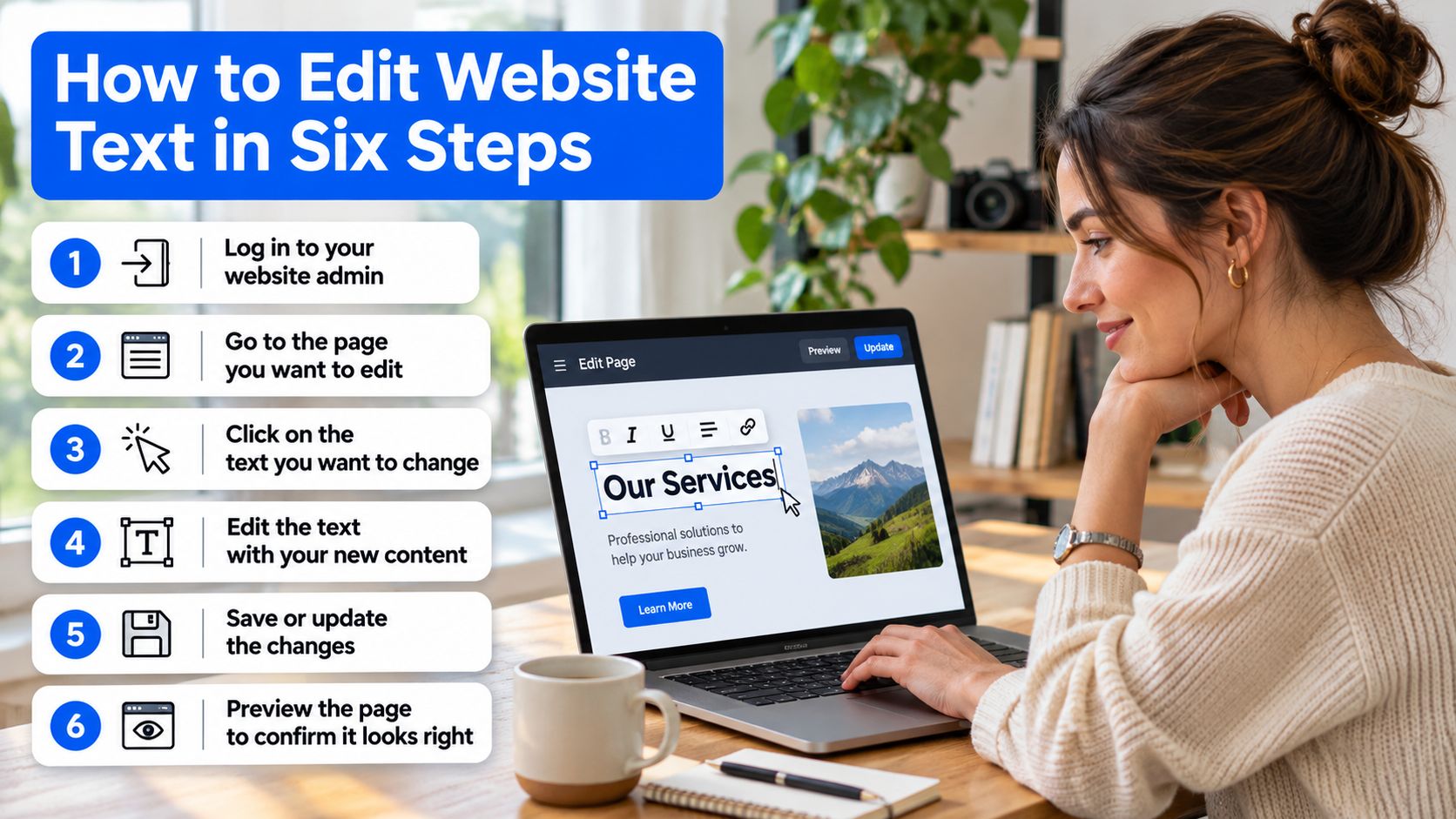
How to Edit Website Text in Six Steps
Before changing anything, locate the actual source of the text. A paragraph may live in the page editor, while the telephone number belongs to a shared header or footer. Button labels, image alternatives and search title fields may sit in separate settings.
Changing text through a browser's inspection panel won't update the website for visitors. The permanent change needs to happen in the site's publishing system.
Make the change deliberately
Save the starting point. Copy the live wording into a document with the page address, including any title, description or button being changed. Keep a screenshot where placement matters, because a text-only record won't show a banner overlapping the contact details.
Write a plain instruction before opening the editor, such as replacing the winter opening hours on the contact page with the spring timetable. Define what stays unchanged, too, particularly when the page contains prices, qualifications or service-area promises.
Rewrite for the customer's task. Put the answer before the background, replace internal jargon with familiar words and split sentences that carry several instructions. For example, a sentence about facilitating appointment enquiries can usually become a direct instruction to request an appointment, while retaining any eligibility conditions.
Preserve the existing structure while editing: keep a main page heading, use properly tagged subheadings and avoid turning bold paragraphs into imitation headings. Links and buttons should still describe the destination or action rather than merely sounding friendlier.
Preview at real mobile and desktop widths, with a tablet-width check where the layout changes. Read from the top as a customer would, checking whether longer wording pushes the phone number below a large banner or makes a button difficult to use.
Publish the approved draft, then inspect the live page rather than trusting the editor's success message. Record what changed and why, so a later review can distinguish an intentional revision from an accidental alteration.
Prefer clarity without stripping out meaning
GOV.UK's clear-language guidance recommends familiar words, short sentences and putting the user's answer first. That doesn't mean removing necessary detail: a repair service still needs to explain exclusions, and an appointment page still needs to describe preparation.
A useful final reading follows the customer's decision. Can the visitor identify the service, understand whether it suits the situation and find the next action without interpreting business jargon?
Saving the starting point matters just as much as writing the replacement. Without it, restoring an unsuccessful rewrite becomes guesswork rather than a straightforward reversal.
Pre-Publish Checks for Every Text Change
Accessibility problems aren't confined to complex code. In the UK Government's monitoring of public-sector websites and mobile apps from 2022 to 2024, 29,787 accessibility issues were recorded and 16,482 were fixed, according to the accessibility monitoring report.
The following pre-publish checks by change type separate factual accuracy from structure and presentation.
| Change type |
What to check |
Common slip |
| Heading text |
Heading levels follow in order with no skipped levels |
Heading chosen for its look rather than its level |
| Link text |
Destination is clear when read on its own |
Click here or Read more with no context |
| Button label |
Names the action, such as Get a quote |
Softened to Learn more, which weakens the intent |
| Image alt text |
Explains the informative image's content or purpose |
Empty alt text or a file name on an informative image |
| Contact details and prices |
Match current business facts exactly |
Old phone number or price left in a snippet or image |
| Page title and description |
Unique for each page and still accurate |
Duplicate title after a page is copied |
| Text colour |
Meets the normal-text contrast minimum cited below |
Pale grey text on a white background |
Check meaning as well as markup
UK public-sector websites must meet WCAG 2.2 AA, according to government accessibility guidance. Private-sector obligations vary, but the standard provides a useful review benchmark rather than a universal statement of business law.
For normal text, the minimum contrast ratio is 4.5:1, as set out in government communications accessibility standards. A colour that looks understated on a designer's screen may make essential instructions difficult to read.
Automated checkers can flag missing alternatives and contrast failures, but they can't reliably decide whether a heading explains its section. Reading the draft aloud exposes missing steps, ambiguous instructions and sentences that require too much interpretation.
Keyboard navigation and a screen-reader check add another perspective. A visually tidy page can still have an illogical reading order or links that make no sense outside their surrounding paragraph.
Approve the exact difference
Reviewers need old wording beside new wording, not an entire page with changes hidden inside it. Operosus returns only the changed parts, shown old against new, for the client to accept or discard; nothing changes on a client's site without the client's approval.
Keep that comparison with a short reason for the edit. Keyword changes deserve the same scrutiny, and the guide to adding keywords to a website provides a separate starting point for that task.
The business owner should approve prices, claims and regulated-service wording personally. A technically valid draft isn't confirmation that its promises are correct.
What to Confirm After You Publish
A successful publication message confirms that the system finished its job. It doesn't confirm that customers can read the new hours, follow the contact link or submit an enquiry.

- Open the live page in a private window on a phone and a desktop. This helps separate the public experience from the logged-in editing view.
- Compare the published wording with the saved change record. Check the affected headings, prices, opening hours and contact details, including shared areas.
- Follow a changed link and complete a contact route. A form test should confirm delivery to the business, not merely display a success message.
- Review any accessibility statement affected by the change. Instructions about getting help or requesting another format need to reflect the current service.
- Retain the previous version until the checks and the agreed review period are complete. Note who can restore it if the owner is unavailable.
- Monitor search impressions, clicks and genuine enquiries over the following weeks. Use a comparable period before publication as the baseline.
In 2024, 85% of the 1,203 public-sector websites and mobile apps monitored had published an accessibility statement, but many statements were out of date, according to the Government Digital Service's monitoring summary. Publishing a statement isn't the same as maintaining it.
Judge outcomes, not a single day
A quieter day doesn't prove that the rewrite failed. Compare equivalent periods and consider changes in demand, holidays and other website activity before attributing a difference to the wording.
A stronger sentence is a draft judgement. More relevant enquiries are a business outcome.
Keep enquiries separate from visits: a page can attract more clicks without producing better opportunities. A routine for keeping a small-business website up to date helps turn that review into an ongoing responsibility.
Also protect changes made by someone else. If part of an Operosus site was changed another way since the last publish, the editor stops and asks before overwriting anything.
Common Editing Mistakes and How to Fix Them
An expensive editing mistake is replacing a working search title or description because the new version sounds more polished. If clicks subsequently fall, the owner needs to investigate the changed wording rather than assuming that fresher copy must be better.
A fall after publication isn't proof of causation. Check whether impressions, search positions or demand also changed before deciding what to restore.
The following common editing mistakes, causes and fixes help separate a wording problem from a publishing problem.
| Symptom |
Likely cause |
Fix |
| Clicks fall after a rewrite |
Title or description changed when it was already working |
Restore the original and change one element at a time |
| Old prices still appear |
Text inside an image or a cached snippet wasn't updated |
Replace image text with real webpage text and recheck; allow for search snippets to refresh |
| Page no longer answers the question |
Detail was cut too far |
Put back the detail customers ask about on calls |
Shorter isn't always clearer
A service page reduced to a polished introduction and a contact button may leave customers unable to decide whether to enquire. Details about coverage, exclusions, appointment arrangements and what happens next often carry more practical value than another promotional sentence.
Say a contractor removes the explanation of site visits to shorten the page. Customers may then need to call just to discover whether an initial assessment is available. The fix isn't more general copy, but the missing answer.
Keyword-heavy rewrites create the opposite problem. Repeating the service and location in every paragraph can make a page harder to scan without helping the customer understand the offer.
Edit for a reason
Good reasons to change a page include a changed service, recurring customer confusion, obsolete facts, an accessibility problem or search queries that the page doesn't answer. Civil Service guidance on accessible publications also stresses regular accessibility testing and maintaining usable content.
A structured website audit can help identify which problem deserves attention first. It prevents a business from polishing paragraphs while leaving a broken enquiry route untouched.
Change-control test: Every substantial edit should have a reason that can be written down before publication.
Weekly rewriting without evidence can remove useful wording. Leaving incorrect information untouched creates a different risk, so the right frequency depends on what has changed in the business or customer experience.
For improvement experiments, change one meaningful element at a time. Necessary factual corrections shouldn't be delayed merely to preserve an experiment.
Choose Your First Safe Edit This Week
The best starting point is a page with an obvious, verifiable problem: an obsolete service description, an incorrect contact detail or opening hours that no longer apply. A complete homepage rewrite introduces too many decisions for a first controlled edit.
Choose a change whose accuracy can be checked against a reliable business record. The owner should be able to state what success means before publishing, whether that's correcting customer instructions or making an enquiry action clearer.
Match the editing method to the workload
- Owner-led editing suits businesses with time to review wording, layout, accessibility and search effects. A familiar publishing routine matters more than having extensive technical knowledge.
- A website builder may suit an owner who wants more predefined layout controls and is comfortable working within templates. It doesn't remove responsibility for accurate prices, useful instructions or checking the live result.
- An agency suits businesses that need strategy and hands-on implementation and are willing to pay for that involvement. The owner still needs to approve factual claims.
Operosus changes can be previewed in the site's real design before publication. That lets an owner judge the actual page rather than approving words in an isolated document.
For the first edit, create a short task record containing the page name, the correction, the person approving it and the review date. Apply the editing routine, complete the relevant checks and compare the published result with that record.
Make the task specific: correct the contact page's opening hours this week, verify the live page immediately after publication and put a follow-up date in the calendar. A named page and a booked review turn an intention into a manageable job.
Operosus builds small-business websites by hand and lets owners propose text changes in plain English, review the differences and approve publication. Visit Operosus to request a free website review and identify a practical first improvement to accuracy, search visibility or enquiries.
